Subtotal $0.00
View cartCheckout
Guides, tools and support whenever you need it.
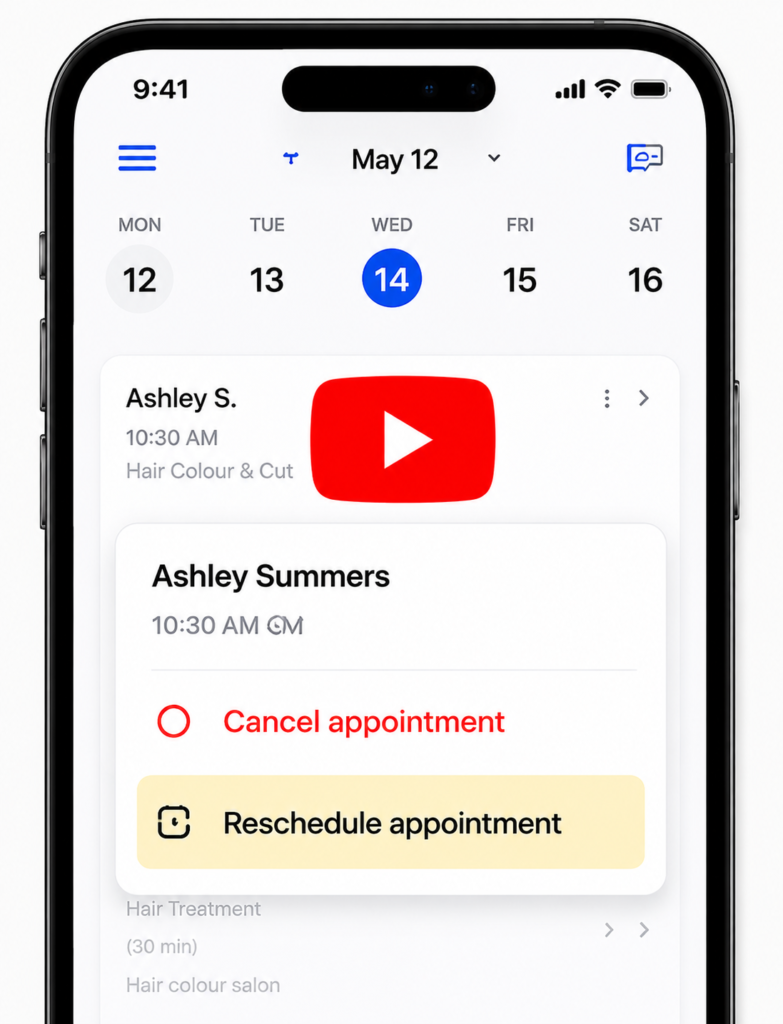
Your calendar in YAS makes it easy to cancel or reschedule appointments in just a few clicks, so you can efficiently manage your schedule and keep your clients informed.
Tap on the appointment you wish to cancel or reschedule.
Select "Cancel appointment" or "Reschedule appointment" from the menu options.
Confirm the cancellation or choose a new date/time for rescheduling.
Notify the client with the automatically generated update.
Contact our support team
Go to your active calendar tab, tap on the targeted booking slot, and click the cancel button. Your client will be immediately updated automatically.
Yes, select the reschedule button to shift the appointment slot to a new date and time based on your open availability grid.
Absolutely. YAS automatically dispatches instant real-time alerts via push notifications and emails to ensure your clients remain informed instantly.
Yes, configure your automated protection policies under the Account Settings tab to manage upfront booking security limits easily.
Our support team is here for you.